Cart 0


What Is CRM Integration? A Complete Guide for Businesses
CRM integration connects your customer relationship management system with other business tools so data flows

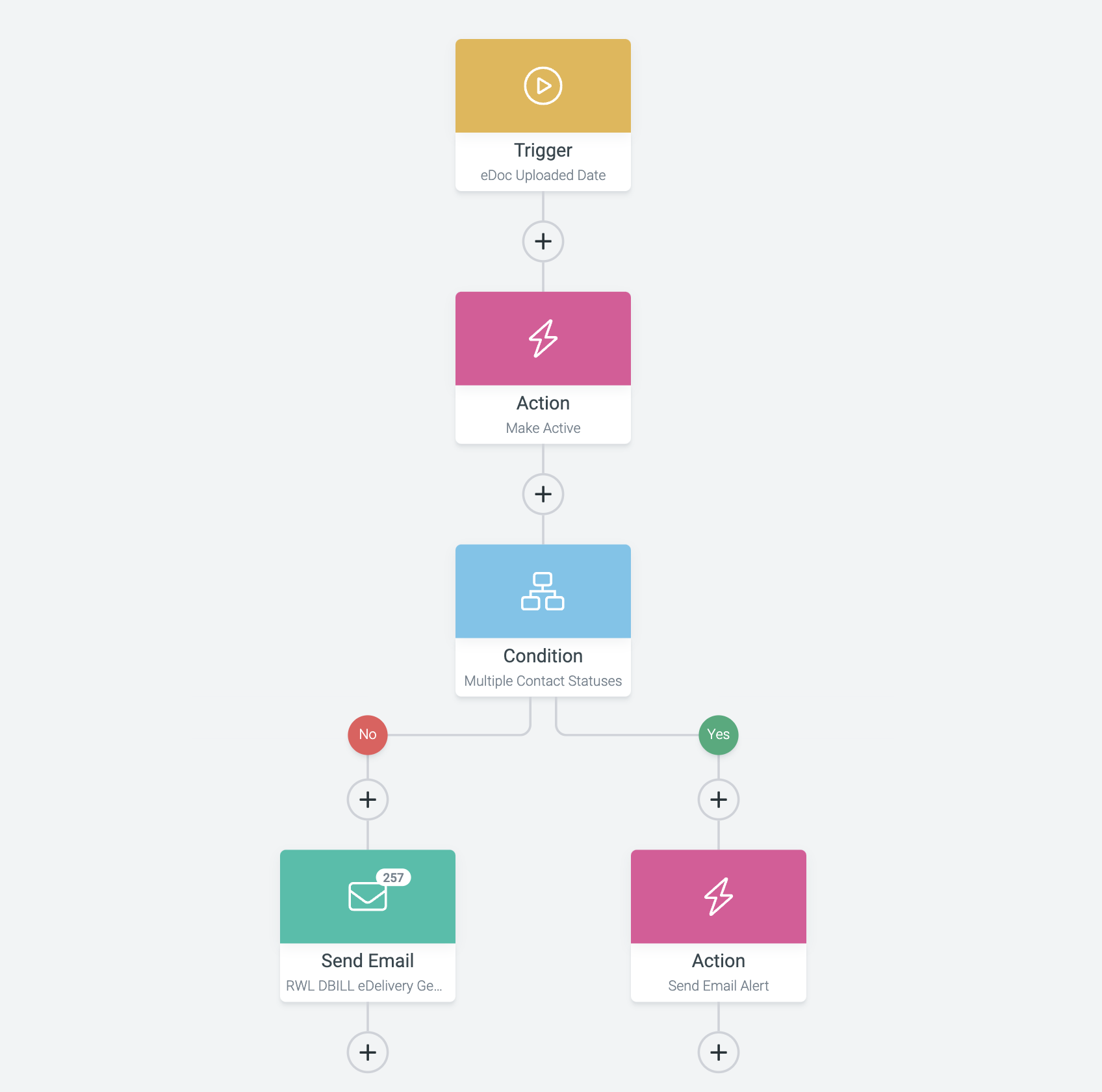
Workflow automation is the use of software to automatically complete repetitive tasks and move work between people, applications, and business systems based on predefined rules. As business process automation is broadly defined, the goal is to replace manual, repeatable steps with technology so employees can focus on work that actually needs human judgment.
Instead of requiring someone to manually perform every step of a process, an automated workflow can trigger actions the moment a specific event occurs. When a potential customer submits a website form, for example, an automated workflow could record the lead, notify a sales rep, send a confirmation email, and add the contact to a CRM — all without anyone touching a keyboard.
A workflow is a series of steps required to complete a process. Traditionally, employees perform these steps by hand. Workflow automation replaces some or all of those manual steps with software, built around five core pieces:
Take a simple lead-generation process: a visitor fills out a contact form, which becomes the trigger. The workflow can then create a lead record, notify the right employee, send a confirmation email, and kick off a follow-up sequence — automatically, without someone manually moving information between systems.
A trigger is the event that starts an automated workflow. Common examples include a customer submitting a form, a new order being placed, a payment clearing, a new employee being added, or a specific date being reached.
An e-commerce business, for instance, might build a workflow that starts the moment a customer completes an order — automatically sending a confirmation, updating inventory, notifying the fulfillment team, and sending shipping information once the order goes out. The trigger is simply the starting point for everything that follows.
Actions are the tasks performed after a workflow is triggered — sending an email, creating a task, updating a customer record, notifying a team member, adding a contact to a marketing list, or sending information to another application. Multiple actions can chain together into a single workflow: a website lead might trigger a lead record, a sales assignment, an internal notification, a confirmation email, and a follow-up campaign enrollment, all from one form submission.
Employees often spend a surprising amount of time on routine administrative tasks. Individually, each one might take a few minutes — but multiplied across hundreds or thousands of instances, that adds up to a lot of working time. Automation helps businesses:
Automation doesn’t mean removing people from the process. In most cases, the goal is letting technology handle the repetitive steps so employees can focus on decisions, communication, and strategy.
A lead generated through a website can automatically enter a sales workflow — captured, stored, routed to the right rep, confirmed by email, and scheduled for follow-up, all without manual handoffs. Businesses looking to tighten up their broader digital process can start with an online presence analysis and audit to spot where digital processes and customer interactions are falling through the cracks.
Workflow automation is everywhere in email marketing. When someone subscribes to a list, an automated sequence can send a welcome email immediately, then branch based on whether that person opens, clicks, downloads, purchases, or goes quiet. Businesses can pair this kind of automation with broader email marketing services to build more organized customer communication.
When a new customer signs up, an automated workflow can create the account, send a welcome email, assign an account manager, build onboarding tasks, and schedule a follow-up. The same logic applies internally — a new employee joining the company can automatically trigger account creation, department notifications, and onboarding task assignments, reducing the chance that something important gets missed.
A completed purchase can trigger workflows for payment confirmation, inventory updates, fulfillment notices, shipping communication, and post-purchase marketing — connecting systems that would otherwise require an employee to manually shuttle information between them.
APIs play a major role in workflow automation because they’re what let separate applications actually communicate. A website might collect customer information and pass it to another platform through an API, which then triggers additional actions on the receiving end — for example, a workflow that connects a website to a CRM, then an email platform, then the sales team, then analytics. Each system does its job while automation handles the handoffs. Businesses with more complex tech environments often need digital marketing services guidance to figure out how their systems should work together.
Without automation, employees have to manually update customer records, assign leads, create follow-up tasks, and send notifications. With automation, all of that can happen based on predefined conditions: a new lead comes in, gets assigned, the salesperson is notified, a follow-up task is created, and a customer email goes out — automatically. This lets sales teams handle more leads without a proportional increase in administrative work, and it keeps records more consistent since fewer people are manually touching them.
Marketing involves a lot of repetitive coordination — website leads, email campaigns, ad data, content distribution, analytics, and social activity all need to move between systems and people. A workflow might start the moment a visitor downloads a resource, then record the lead, send a follow-up email, notify the marketing team, and enroll the contact in a relevant campaign.
Content marketing benefits from the same approach: a workflow that notifies an editor when a draft is done, then automatically creates a publishing task once it’s approved, keeps production organized even with several people involved.
SEO includes both strategic work and repetitive supporting tasks. Automation can handle reporting notifications, ranking-change alerts, and task organization, but it shouldn’t replace the judgment behind technical SEO, content quality, and internal linking decisions. Businesses looking to improve organic performance can pair automation with dedicated search engine optimization services.
Customer service teams can automate a lot of the routine handling around a support request — receiving it, categorizing it, assigning it to the right team, sending an acknowledgment, creating a task, and escalating urgent cases. What automation shouldn’t do is make it harder for a customer to reach an actual person when a problem needs real attention.
Automation isn’t automatically beneficial just because a process technically can be automated.
A good candidate for automation usually shares a few traits: it happens frequently, follows predictable steps, involves repetitive data entry, touches multiple software systems, causes delays, or is prone to manual error. Sending the same confirmation email after every form submission is a strong automation candidate. Building a creative marketing strategy generally isn’t — it requires analysis and judgment that automation can’t replace.
As companies grow, operational complexity tends to grow with them — more customers means more forms, orders, emails, support requests, and internal tasks. Workflow automation provides a scalable foundation for handling that volume without a matching increase in administrative headcount, especially when it’s paired with a broader digital marketing strategy and a well-developed website. Businesses can also lean on conversion rate optimization services to improve what happens after a visitor takes action, while automation manages what happens next.
Workflow automation works best when it’s treated as part of a larger business strategy rather than a standalone tech project. A business can have a great website, marketing campaign, or CRM, but inefficient handoffs between those systems still create unnecessary work. For businesses evaluating where automation fits into their broader online growth, a free SEO analysis is a useful starting point for spotting gaps in the digital presence overall.
What is a simple example of workflow automation?
A common example is a website contact form that automatically creates a CRM record, notifies a salesperson, and sends the customer a confirmation email — all without manual intervention.
Does workflow automation replace employees?
No. Automation typically handles repetitive, predictable tasks so employees can spend more time on work that requires judgment, creativity, or relationship-building.
What processes should not be automated?
Processes involving complex judgment, sensitive customer situations, or creative strategy usually still benefit from human involvement rather than full automation.
How do I know if a process is a good fit for automation?
Look for tasks that happen frequently, follow predictable steps, involve repetitive data entry, or are prone to manual error — those are the strongest automation candidates.
Workflow automation lets businesses replace repetitive manual steps with structured, technology-driven processes. Using triggers, actions, rules, and integrations, companies can move information between systems, notify employees, manage leads, and complete routine work more efficiently — without removing the human judgment that still matters most.
The most effective automation strategies don’t try to automate everything. They automate the right processes, then let people focus on strategy, relationships, and decisions that require real expertise. Ready to see where automation could tighten up your marketing and sales operations? Schedule a consultation with Triforce Digital Marketing.
CRM integration connects your customer relationship management system with other business tools so data flows

Artificial intelligence is changing how businesses operate, market, hire, and grow. Here is a practical

When choosing how to allocate your marketing budget, the question of SEO vs. PPC is
Please Check Your Inbox to Download the Resource!